
Frequently asked questions

FAQs
Payoneer is a cross-border business payment platform. This means that it is for receiving business payments against a service or product from your overseas clients.
- IT services provider or IT professionals who work as a group or agency and provide services to overseas clients and regularly receive payments from them
- Traditional exporters who export goods to overseas clients and receive business payments in Pakistan
- Online sellers who sell on marketplaces like Amazon, eBay, Etsy and Alibaba etc.
- Individuals or companies who regularly freelance on websites like Fiverr, Upwork, People per hour etc.
You should ideally create your account 2 weeks prior to receiving your first payment. Creating an account without any source of earnings can cause issues later.
Setting up an account along with verification does not take more than 2 weeks. Please abstain from creating an account without any source of incoming payment
Payoneer’s fundamental objective is to make business payments from your overseas clients as easy and convenient as possible in the most compliant manner. Below are the core products and services that Payoneer offers?
- Request Payment Link: This allowed you to get paid by overseasclients via credit card, client’s local bank transfer or e-check. This serviceis ideal if you have direct clients overseas. IT professionals/companies, smallexporters use this service regularly as it is ideal for them
- Local Receiving Account: This allows you to create local accounts in 9+ currencies to receive payments from overseas clients. This includes USD, GBP, EUR among other currencies. For eg. if you have a client in US, all you have to do is share USD Local Receiving Account details with them and they will transfer it like a local transfer.
- Marketplaces:
a. Freelance: This includes marketplaces like Fiverr, Upwork, People per hour etc. where we are available as a payment method. You can create an account directly or from these platforms as well. This option is for regular freelancers who receive funds regularly.
b. Sellers: This includes marketplaces like Amazon, eBay, Etsy and Alibaba. You can use our payment method on these marketplaces. For Amazon, you can attach a Local Receiving Account (see no.2) - Payoneer to Payoneer Payments: This allows you to transfer funds from one Payoneer Account to another Payoneer Account. These payments must be business payments in nature. This means that the payment must be against a delivery of business service or product. Payments to friends and family for personal purposes is not allowed. Any selling of currency does not constitute as business.
- Payoneer to outside network Payments: This allows Payoneer users to pay their contractors, suppliers and freelancers outside of Payoneer network directly into their local and international bank accounts. You can also make batch payments to your suppliers, contractors and freelancers (payments in one go).
- Amazon Ad expenditure: Payoneer allows you to pay for your Amazon ad expenditure from your Payoneer balance.
- Payoneer Commercial Card: Payoneer Commercial Card can be used by active AHs who regularly receive payment in their Payoneer account. Minimum balance to be eligible is $100 th¬at has to be received as a business payment in your Payoneer Account.
A business payment is a payment done against an exchange of goods and services. Buying and selling currency does not constitute a business payment. An exchange of goods and services must be verifiable via an official authentic invoice detailing services, delivery, amount transferred, names of both entities, dates etc. or via an exchange of official email and communication between two parties to prove legitimacy.
- An individual account is recommended when you do not operate as an agency, team or company. You are operating as an individual. The core difference lies in the verification required and the products that can be utilized. For individual account you will need the following:
i. Personal ID like NIC, driving license, Passport etc.
ii. Authentic online presence of your business that can be verified from an active website, marketplace link from Fiverr or Upwork or marketplace where you are freelancing. If you are a seller then, link to your active online store. Please abstain from sharing dummy profiles as these will not be accepted.
iii. Bank Account details matching the exact name as your Payoneer Account and identity documents. Please do not attach friends and family’s bank accounts to your account or a bank account in a name different from that on your Payoneer Account or any of your personal identity documents like NIC, driver’s license and passport.
iv. Address that is present on your bank document and can be verified later as such. If addresses are different, please get it rectified on your bank documents by visiting your bank before attaching it with Payoneer - For Company account, you will be able to additionally use Wire transfer service along with other services. You should create a company account if you have an incorporated entity in Pakistan with SECP. Companies incorporated as Sole Proprietors are not eligible for a Company Account. Companies that are eligible are as follows:
i. SMC Pvt Ltd.
ii. Pvt Ltd.
iii. Partnerships (Association of Persons)
Documents required for Company Account are as follows:
i. SECP incorporation certificate
ii. Bank Account details – Company Account Title, Payoneer Company Account Title and Company name on SECP certificate must match
iii. Official active website link that clearly outlines the services or products of the company - Core differences between Company Account and Individual Account
i. Limits: Company account have no daily or per transaction limits on volumes. For monthly payments above USD 10,000, it is recommended to create a Company Account. For individual accounts, transaction limits per day and per month are set at USD 10,000. It may increase on a rolling basis for active users who satisfy pre-requisites.
ii. Verification requirement: Verification requirements as outlined above are different for company and individual accounts
iii. Services: Individual Account do not have access to Wire Transfer while for active and regular Company Accounts, the service can be extended
- You cannot have two Individual Accounts. This will lead to account closure.
- You can request for one Company Account in addition to Individual Account however, this has to be requested to the customer support to create an exception. If you have higher volumes and are a regular customer, then Payoneer Team will handle your query.
Please contact support for request of account closure. Once you have received email confirmation of account closure, then only proceed with creating a new account. Please note that Payoneer is a regulated company and is compliant. Multiple accounts are not allowed and can lead to account closures.
- You will be eligible if you have received $100 in your Payoneer Account as a business payment. Please refer to definition of what constitutes a business payment.
- You can order the card by going to your Account > Settings > Go to Card > Order a new card
Payoneer offers Payoneer Commercial Card Program. The card can be either physical or virtual. It is available in USD, GBP, EUR. You can have one card at a time. Virtual card is ideal for paying online for marketing and business expenditures. This includes ad expenditure, paying contractors, suppliers, remote team workers etc. Physical card can additionally be used with an ATM and while travelling. Please refer to this page for fee structure (https://payoneer.custhelp.com/app/answers/detail/a_id/6114/~/what-are-the-fees-associated-with-using-the-payoneer-card-at-an-atm%3F) and (https://www.payoneer.com/solutions/marketplaces-networks/services-and-fees/)
- For a card to be successfully issued, you will be required to submit Proof of Residence. For this requirement, you can submit your bank statement that clearly shows your address. The address must match the address that you shared while registering your Payoneer Account. For Company Accounts, you will share your bank statement of company account and it must match the company address shared while creating your Payoneer Company Account
- In case, the address is different, please contact your bank to update your address
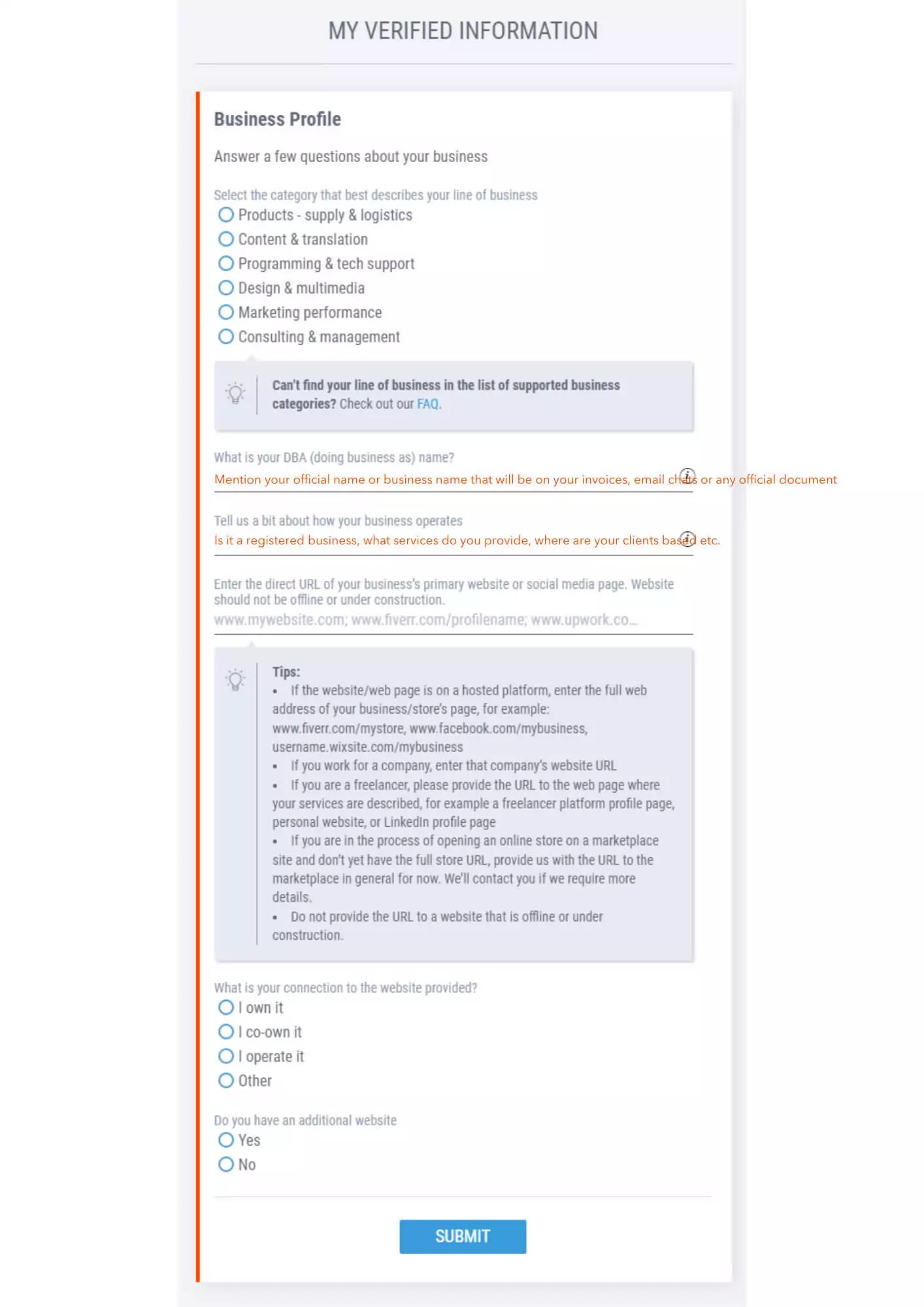
- By default everyone is eligible. All you have to do is go to Get Paid > select Global Payment Service > Fill out the questionnaire > Wait for Approval > Upon Approval, your local receiving account details will be received
- Sample: questionnaire
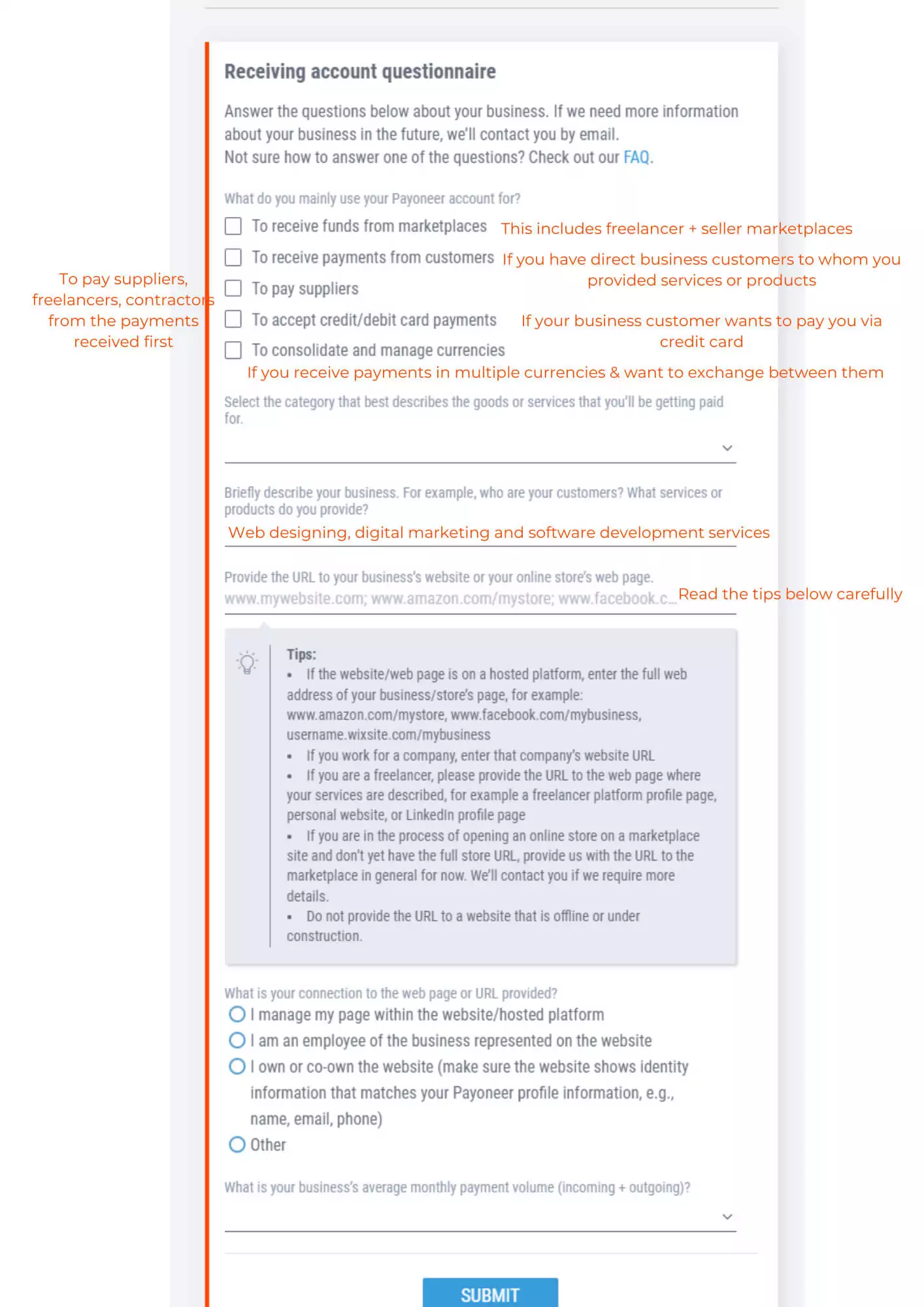
- By default everyone is eligible. All you have to do is go to Get Paid > select Global Payment Service > Fill out the questionnaire > Wait for Approval > Upon Approval, your local receiving account details will be received
- Sample: questionnaire
Please submit an authentic invoice that clearly details the following:
- Invoice number
- Company/Individual Name
- Services/goods against which invoice is created
- Date of invoice – must be within the same week as payment received or before the payment is received
- Amount – this should match the amount received
- Exact name of payment receiver- should match Payoneer transaction
- Exact name of payment sender- should match Payoneer transaction
- Line of Business- this should be clear from the description of services and goods provided
- Business Address- verifiable by Bank account and should match the address shared with Payoneer
Once the funds have been sent to your account, you will receive an email from Payoneer showing an estimated time of arrival of funds. You may only contact support to follow up if the funds have not landed in your account beyond that time period.
Please following the schedule below:
| Service/Product Working Days | Service/Product Working Days |
|---|---|
| Local Receiving Account | 5 |
| Request a Payment Link | 3 to 5 |
| Bank Withdrawal | 3 to 5 |
| Partner Bank Withdrawal | Instant |
| Marketplace payments (Fiverr, Upwork etc) | 3 to 5 |
- With partner banks like FBL, HBL and Jazz Cash the transfers are in real-time. However, in some occasions, it may take up to 1-2 business days
- With other local banks, it can take up to 3-5 business days. You may only contact support once 5 business days have passed. Business days exclude any public holidays and weekends.
- A work contract is any agreement between you and your client where you have agreed on terms of transactions. This can be an email from official ID’s, conversation on marketplaces, Whatsapp chat from business accounts (matching your contact details), an invoice (see above requirement for authentic invoice), an official word/pdf document.
- A work contract should be authentic and not created afterwards. It is recommended you document your official emails before contracting with a client detailing the conversation and terms of transaction. Please document each detail. Payoneer is a compliant company.
In such circumstances, please contact support or submit your query on the link below: https://forms.gle/2ySefj1BJMd4rYsJ9
You can’t. Payoneer does not support self-loading. You need to have a legitimate source of earning overseas and can use Payoneer to receive those business payments. Once the payment is received in your account you may withdraw it, use it via Payoneer Commercial Card or pay your suppliers/contractors/freelancers from the platform.
Every time a verification is opened, there is a tip section below that clearly describes what is required. You may read the requirement and as per the requirement may share a screenshot of the control dashboard of the website that shows your login, URL on top and other control areas. Similarly for freelance and online stores, you may show the dashboards to prove affiliation.
Payoneer is a business payment platform. In order to ensure, it remains that way, after a certain threshold, you will be required to receive payments from marketplaces and direct client to prove that your payments are indeed business payments. You may ask your client to pay you via Request a Payment link or local receiving account (if they pay via Company Bank Account). Additionally, if they are a local company, they can pay you via pay contractors/suppliers feature directly into your bank account.
